blog.Ring.idv.tw

2007 June

「Layer」、「Level」和「Depth」之間的三角關係(四)

經由「Layer」、「Level」和「Depth」之間的三角關係()的相關實例與驗證,我們整理出一些重點出來,進而釐清這三者之間所存在的微妙關係,如下述幾點:

「Layer」、「Level」和「Depth」重點概念

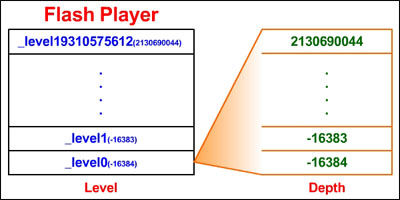
1.基本上在Author time所呈現的視覺化「Layers」都將被轉化為「Depths」。

2.每個「MovieClip」都擁有自己的「Depth」。

3.「Depth」範圍在「-16384~2130690044」均可指定。

4.「Level」是隸屬於「Flash Player」中的堆疊結構。

5.「Level」級數可達「0~19310575612」。

「A picture is worth a thousand words」

從上述的幾個重點,筆者繪製下圖以方便理解:

換句話說,如果我們在撰寫ActionScript的一些應用時,倘若沒有使用到任何與「Level」有關的function,例如:「loadMovieNum()」、「loadVariablesNum()」等等…,其實絕大部份我們只會在「_level0」活動活動筋骨而已,然而掌握住這些要點,卻是奠定往後釐清各個觀念的不二法門,例如:「變數範圍」…。

2007-06-10 01:43:10 | Add Comment

Installing Flash Lite 2.1 on CHT9000

今天終於拿到比賽的測試機:多普達「CHT 9000」,當然毫無疑問地先給它裝上Flash Lite。

簡易安裝步驟

Step 1.下載Flash Lite 2.1 for Windows Mobile 5.0(請下載Pocket PC Devices)

Step 2.將flashlite2_1_winmobile5_ppc.CAB傳至你的手機,接著直接點選安裝即可。

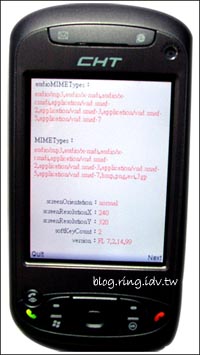
由於不曉得此機種支援哪些Flash lite的功能,所以我寫了一個簡單的「handset_test」來測試它:

不支援的部份:

hasAccessibility
hasAudioEncoder
hasMFI
hasMouse
hasPrinting
hasScreenBroadcast
hasScreenPlayback
hasStreamingAudio
hasStreamingVideo
hasVideoEncoder

ImageMIMETypes:

bmp,png

VideoMIMETypes:

avi,3gp

手機王「CHT 9000」詳細規格

2007-06-09 22:22:33 | Add Comment

影音轉檔工具-MEncoder

想要將影音檔轉為Flash Video(flv)嗎?試試它吧~

MEncoder - Wikipedia:

MEncoder is a free command line video decoding, encoding and filtering tool released under the GNU General Public License.
It is a close sibling to MPlayer and can convert all the formats that
MPlayer understands into a variety of compressed and uncompressed formats using different codecs.

安裝說明

Step 1:下載Mplayer

Step 2:下載Codecs

Step 3:將Codecs全部的檔案搬移至Mplayer目錄底下的「codecs」子目錄。

3gp轉flv

指令:

C:\mplayer>mencoder -vf scale=320:240 -ffourcc FLV1 -of lavf -lavfopts i_certify_that_my_video_stream_does_not_use_b_frames -ovc lavc -lavcopts vcodec=flv:vbitrate=200 -srate 22050 -oac lavc -lavcopts acodec=mp3:abitrate=56 test.3gp -o test.flv

其它格式像是「wmv」、「mov」及「avi」也都可以成功轉碼~

參考資料:

MP4 encoder

Mp4 encoder for psp

在线转FLV

用Mencoder进行任意视频格式转换成flv

FFmpeg MEncoder FLV 3GP FlvMdi Avisynth 加水印参数

線上轉FLV

2007-06-08 12:30:59 | Comments (4)

桌子變電腦了?Microsoft Surface

Microsoft Surface,來嚐鮮一下這有創意的東西吧~

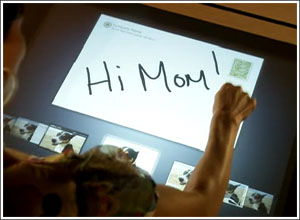
從「桌子即電腦 微軟SURFACE電腦介面創新人性化」這篇報導中,有提到如下文:

當我把手指放在這兒,有個攝影機能辨識我在碰觸哪個地方,事實上我可以碰觸桌子的任何地方,所以它其實是,配有新的SURFACE技術的視窗個人電腦。

不只使用觸控式技術還整合了攝影機來達成這樣子的互動~果然不錯!!

2007-06-08 00:30:54 | Add Comment

「Layer」、「Level」和「Depth」之間的三角關係(三)

前面我們已經探討過「Layer」及「Depth」兩者之間的關係,也知道每個「MovieClip」都擁有自己的「Depth」,然而到目前為止我們仍未探討到「Level」,或許我們並不常使用到它,也可能永遠都不會用到它,但唯獨了解這三者之間的關係才有辦法打通任督二脈,所以本文將試著剖析這個鮮為人知的「Level」。

Flash Player擁有「Level Stacking Order」

根據[1]官方文件的說明,我們可以得知「Level」是一種屬於「Stack」的資料結構,也就是俗稱的「堆疊」,君不見Java Virtual Machine 或 Flash Player 都是以「堆疊」為基礎的虛擬機器,而在這裡Flash Player也將「Level」以「堆疊」的方式來運作之,既然知道它是以「堆疊」的方式運作,那是否有其限制「Level」的級數呢?這裡筆者測試了一下,在「Flash CS3」的環境之下,「Level」的級數確實可達到「0~19310575612」,然而重點在於「Level」和「Depth」之間的關係到底為何?底下我們試著用例子及圖例來解釋之。

我們將「Layer」、「Level」和「Depth」之間的三角關係(一)所驗證的範例拿來修改一下,並額外製作一個獨立的「粉紅方形」的SWF檔(test.swf),以供驗證。

程式一

trace("a_mc:"+a_mc.getDepth());
trace("b_mc:"+b_mc.getDepth());
trace("c_mc:"+c_mc.getDepth());
trace(_root);
trace(a_mc);
trace(b_mc);
trace(c_mc);
loadMovieNum("test.swf",1);

結果:
圖一

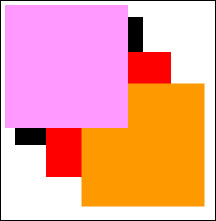
從結果中我們看到被載入的「test.swf」覆蓋了底下三個方形,所以我們可以確定「Level」級數愈高就呈現在愈上層,就算底下其中一個方形的「Depth」給予最大值(2130690044),仍然是無法超越「Level 1」,其實原因很簡單,底下三個方形都處於「Level 0」的級數中,然而「Depth」就是「Depth」,它是隸屬於「MovieClip」之中的,而「Level」卻是隸屬於「Flash Player」中的堆疊結構,所以「Level 1」的方形必凌駕於「Level 0」之上。

程式二

trace("a_mc:"+a_mc.getDepth());
trace("b_mc:"+b_mc.getDepth());
trace("c_mc:"+c_mc.getDepth());
trace(_root);
trace(a_mc);
trace(b_mc);
trace(c_mc);
a_mc.swapDepths(2130690044);
trace("a_mc:"+a_mc.getDepth());
loadMovieNum("test.swf",1);

結果:
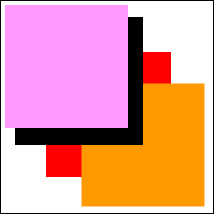
圖二

欲將外部的SWF載入至「Level 0」,請注意下列這段說明:

If you load a SWF file into level 0, every level in Flash Player is unloaded, and level 0 is replaced with the new file.
The SWF file in level 0 sets the frame rate, background color, and frame size for all other loaded SWF files.

參考資料:

[1]Flash 8 Documentation-loadMovieNum function

範例下載

本文若有任何謬誤,希望請不吝地賜教,若能指正不勝感激。

2007-06-05 00:04:33 | Add Comment

Next Posts~:::~Previous Posts
Copyright (C) Ching-Shen Chen. All rights reserved.

::: 搜尋 :::

::: 分類 :::

::: 最新文章 :::

::: 最新回應 :::

::: 訂閱 :::

Atom feed
Atom Comment