blog.Ring.idv.tw

2008 April

「blog.Ring.idv.tw」一歲了~

本站自從「2007年4月30日」開站以來~ 在這整整一年的瀏覽人數達到了「166,866」~ 好吉利的數字呀! ^^ (雖然可能有為數不少的是Crawler所造成的XD)

底下是一些相關的紀錄:

.第一篇文章「Ring's Blog 正式啟用囉~

.「2007年11月2日」我的網站出現了Google PageRank分數「4」

.「部落格觀察」排行從「20701」進步到目前「4605

.本站到目前為止最火紅的一篇文章為「手動下載「天空部落」影音」XD~

希望能持續地分享經營下去~ ^^ 記得給我一些鼓勵呀~ 不然我可是會關站的~ 哈哈

好了~ 今天忙了一整天了~ 來去休息~ 明天又要出遠門~ XD

2008-04-30 00:05:34 | Comments (3)

申請APOL「.cn」中文網域只要88元~ 促銷中~

APOL「cn」網域促銷中,如果您想要自行學著架設DNS伺服器~ 或是您需要有一個個人的網域名稱~

那就不要錯過啦~ 現在只要申請「.cn」網域第一年都只要88元~ 很划算哦~

我這個「ring.idv.tw」每年都要400元咧~ 所以呢~ 有需要的人趕緊去申請吧~ ^^

P.S. 話說我已經申請了「swiler.com.cn」~ 嘿嘿~ (其實本來想申請「ilove.com.cn」滴~ = =")

補充說明

今早申請後~ 「www.Swiler.com.cn」現在是下午2:45分已經可以work了~ 蠻有效率的~ ^^v

2008-04-28 09:45:59 | Comments (3)

Web Scraping for Yahoo!生活+

在自然語言處理的領域中,有愈來愈多直接將網路資料當做語料庫(Corpus)來使用的趨勢~ 而要達成這樣的應用,當然需要有一個類似Web Crawler的機器人程式~ 來幫我們進行前置的搜集作業~ 而本文就是要做一個這樣的應用~ 這裡以「Yahoo!生活+」當做例子~

底下程式您可以自由地更改及使用~ 如果您有為它加上些許功能,也歡迎您貢獻您的成果 ^^

WebScraping.php

<?php
/**
 * Date: 2008/04/26
 * Shen(http://blog.ring.idv.tw)
 */
interface WebScraping
{
	public function doQuery();
	public function getBody();
}
?>

YahooLife.php

<?php
/**
 * Date: 2008/04/26
 * Shen(http://blog.ring.idv.tw)
 */
require_once "HttpClient.php";
require_once "WebScraping.php";

class YahooLife implements WebScraping
{
	private $param = "";
	private $body = "";
	
	function __construct(){}
	public function setKeyword($keyword)
	{
		$this->param = urlencode($keyword);
	}
	public function doQuery()
	{
		if($this->param != "")
		{
			$body = HttpClient::quickGet('http://twsearch.lifestyle.yahoo.com/search?cate=store&type=biz&p=' . $this->param);
			$body = str_replace("<em>",'',$body);
			$body = str_replace("</em>",'',$body);
			$this->body = $body;
			return true;
		}
		return false;
	}
	public function getBody()
	{
		return $this->body;
	}
	public function getStoreAddress()
	{
		$regex = '/<address>(.*)<\/address>/Us';
		preg_match_all($regex,$this->body,$match);
		return $match[1];
	}
	public function getSatisfaction()
	{
		$regex = '/<img src=\"http:\/\/tw.yimg.com\/i\/tw\/lifestyle\/icon_star0(.*).gif/Us';
		preg_match_all($regex,$this->body,$match);
		return $match[1];
	}
	public function getStoreID()
	{
		$regex = '/http:\/\/tw.wrs.yahoo.com\/\*\*http%3A%2F%2Ftw.lifestyle.yahoo.com%2Fbiz.html%3Fbizid%3D(.*)\">/Us';
		preg_match_all($regex,$this->body,$match);
		return $match[1];	
	}
}
?>

YahooStore.php

<?php
/**
 * Date: 2008/04/26
 * Shen(http://blog.ring.idv.tw)
 */
require_once "HttpClient.php";
require_once "WebScraping.php";

class YahooStore implements WebScraping
{
	private $storeId = "";
	private $body = "";
	
	function __construct(){}
	public function setStoreID($id)
	{
		$this->storeId = $id;
	}
	public function doQuery()
	{
		if($this->storeId != "")
		{
			$body = HttpClient::quickGet("http://tw.lifestyle.yahoo.com/biz_comment.html?bizid=" . $this->storeId . "&psm=");
			$this->body = $body;
			return true;
		}
		return false;
	}
	public function getBody()
	{
		return $this->body;
	}
	public function getStoreComments()
	{
		$regex = '/<blockquote>(.*)<\/blockquote>/Us';
		preg_match_all($regex,$this->body,$match);
		return $match[1];
	}
	public function getSatisfaction()
	{
		$regex = '/<img src=\"http:\/\/tw.yimg.com\/i\/tw\/lifestyle\/icon_star0(.*).gif/Us';
		preg_match_all($regex,$this->body,$match);
		return $match[1];
	}
}
?>

測試範例

<?
require_once "YahooLife.php";
require_once "YahooStore.php";

$Ylife = new YahooLife();
$Ylife->setKeyword("美食");
$Ylife->doQuery();
$address = $Ylife->getStoreAddress();
echo "<h2>商家地址</h2>";
show($address);

$satisfaction = $Ylife->getSatisfaction();
echo "<h2>商家滿意度</h2>";
show($satisfaction);

$storeid = $Ylife->getStoreID();
echo "<h2>商家ID</h2>";
show($storeid);

// sleep for 2 seconds
sleep(2);

$Ystore = new YahooStore();
$Ystore->setStoreID($storeid[1]);
$Ystore->doQuery();

$comments = $Ystore->getStoreComments();
echo "<h2>商家評價意見</h2>";
show($comments);

$satisfaction = $Ystore->getSatisfaction();
echo "<h2>商家評價滿意度</h2>";
show($satisfaction);

function show($value)
{
	foreach($value as $v)
		echo $v . "<br/>";	
}
?>

取得原始碼

2008-04-26 21:11:47 | Add Comment

寫一個Hello World的PHP Extension

Java中我們可以透過JNI的方式來進行和C語言的溝通~ 而這不外乎要遵循一些共通的介面來達到~ 當然PHP也是如此~ 有興趣的話可以看看「PHP Source Code/ext」底下的一些extension,像是PDOGD等等~ 都是這樣達成的~

所以像Youtube這樣用PHP寫成的網站還要結合後端轉檔程式該怎麼做呢?

由於筆者不是Youtube的工程師~ 恕無法提供正解~ XD

不過若要比較「完善」地結合像FFmpeg這樣的函式庫~ 那採用寫一個PHP Extension的方式倒是不錯的解決方案~

所以本文主要的訴求就在於開發一個屬於自己的Hello World的PHP Extension。

hello.c

#include "php.h"

ZEND_FUNCTION(hello);
zend_function_entry hellomodule_functions[] =
{
    ZEND_FE(hello, NULL)
    {NULL, NULL, NULL}
};
zend_module_entry hellomodule_module_entry =
{
    STANDARD_MODULE_HEADER,
    "Hello Module",
    hellomodule_functions,
    NULL, 
    NULL, 
    NULL, 
    NULL, 
    NULL,
    NO_VERSION_YET,
    STANDARD_MODULE_PROPERTIES
};

#if COMPILE_DL_FIRST_MODULE
ZEND_GET_MODULE(hellomodule)
#endif

ZEND_FUNCTION(hello)
{
	RETURN_STRING("HELLO WORLD",1);
}

Compiling

先進行編譯處理~

gcc -fpic -DCOMPILE_DL_FIRST_MODULE=1 -I/usr/local/include -I. -I/usr/include/php5 -I/usr/include/php5/Zend -I/usr/include/php5//main -I/usr/include/php5/TSRM -c -o hello.o hello.c

Linking

然後產生一個Shared Object~

gcc -shared -L/usr/local/lib -rdynamic -o hello.so hello.o

掛上hello module

cp hello.so /usr/lib/php5/20060613+lfs/

修改「php.ini」,加上「extension=hello.so]~ 然後重新啟動您的Apache Server

vi /etc/php5/apache2/php.ini
/etc/init.d/apache2 restart

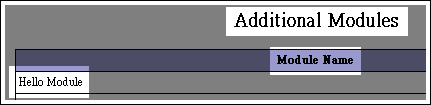
最後用「phpinfo()」來驗證是否已掛上自己的Extension~ 成功的話會看到下圖:
測試HelloWorld

<?php
echo hello();
?>

看到畫面出現「HELLO WORLD」就成功啦! ^^

不過如果您不想那麼麻煩的掛載extension,也可以考慮用「dl()」來動態載入達成~

相關細節可以參考下述資源~

參考資源

PHP: Creating Extensions - Manual

PHP: Source Discussion - Manual

Extension Writing - devzone.zend.com

類似文章

用Java來和C做溝通的介面 - JNI

2008-04-25 21:28:18 | Comments (9)

Google 2008 台北程式開發日

來吧~ 來去參加「Google 2008 台北程式開發日」~ ^^ 其實最想要的是Google的T-Shirt~ 哈哈~ 當天就給它換上試穿~ 嘻嘻~

議題

.雲端運算

.Gears codelab

.Advanced Maps API

.Android應用入門

.GData API

.Maps API Case Study

.OpenSocial:社交網站的標準

P.S. 話說我的指導教授要準備三台電腦給我玩Hadoop~ 嘿嘿~ 雖然比不上UMD有IBM提供的40台~ 不過對我來說~ 夠了~ 來吧~ 我也準備好了 ^^

2008-04-24 01:00:36 | Add Comment

Previous Posts
Copyright (C) Ching-Shen Chen. All rights reserved.

::: 搜尋 :::

::: 分類 :::

::: 最新文章 :::

::: 最新回應 :::

::: 訂閱 :::

Atom feed
Atom Comment